
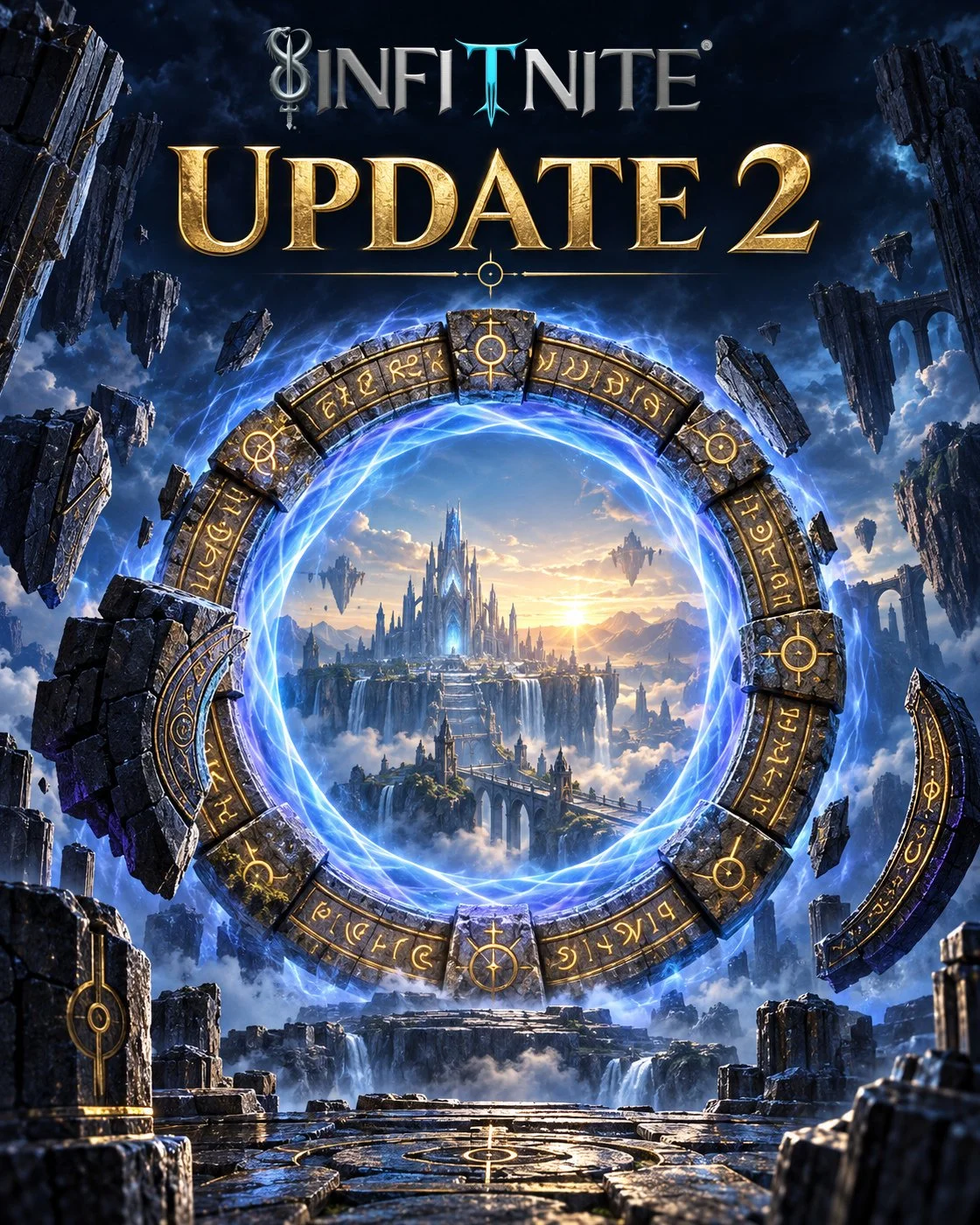
Your Avatar has a new look, your workouts have a full combat upgrade, and all five hubs have been redesigned. Update 2 brings those changes together with improvements across all eight Vanguard locations, a new opening experience, expanded skills, refreshed world artwork, and the everyday fixes you've asked for.
Since Update 1 on August 18, I've been working through the problems and ideas you've shared in the Warrior's Circle, our in-game forum, in World Chat, and by email. Some of you were discovering Infitnite for the first time. Others came back to see how it had changed. Both perspectives helped.
If you're new here, Infitnite is a fitness fantasy RPG where your real workouts, nutrition, learning, and community activity help your Avatar, your fantasy representation in Infitnite, grow.
I committed to launching on Infitnite's fifth anniversary in August. The short alpha and beta periods meant there wasn't enough time to fully test and polish every part of the experience. I focused on how much the game could offer, and some of the reliability and flow you needed suffered. Update 1 began addressing that. Update 2 goes much further, bringing Infitnite closer to the game I wanted you to meet at launch.
This article covers the major additions and the fixes released since Update 1. Reliability, consistency, and optimization have stayed at the center of that work, alongside the ways you've asked to understand your Warrior and enjoy playing.
New full-body Avatars and matching portraits
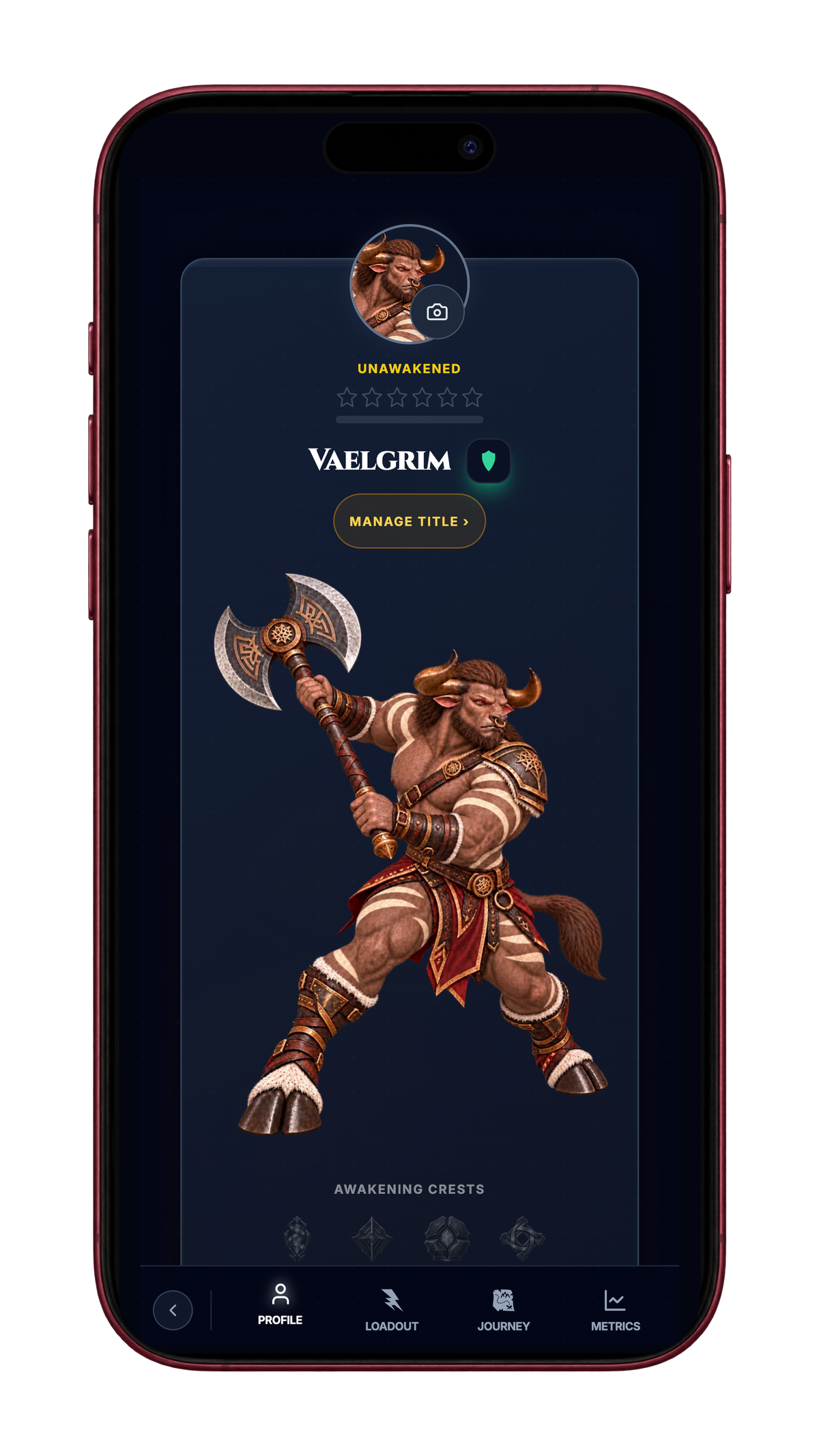
Minotaur, Revenant, and Synth Warriors now have full-body art on their profiles, with matching default portraits. The art follows your race, lineage (your ancestry within that race), gender, and role (your chosen approach to combat). There are 144 reviewed combinations across those choices, giving your Warrior a more distinct presence when you open your profile.
Your build choices don't change the artwork yet. This update connects the art to the identity you've chosen, while preserving your profile-photo choice.
Your profile shows more of your journey
Your profile now brings your Warrior's identity and progress together more clearly. Your portrait, race, specialization (your training focus), role, title, and Power (your Warrior's strength rating) have a more organized home, alongside achievements and the marks you've earned.
Account Badges represent parts of your account's history and identity. For accounts with recorded Awakening progress, Awakening Crests give those milestones in your Warrior's development a distinct place on the profile.
Title details make it easier to inspect a title and understand its requirements before deciding what to display. Your achievement showcase also follows your saved account choices, so the achievements you select aren't tied only to one device.
Profile-photo uploads and portrait display received fixes as well. A picture you choose now shows up consistently where other players encounter you, including community surfaces. The profile is a more useful record of the Warrior you've been building, with more control over how you present that record.
Five redesigned hubs, one connected world
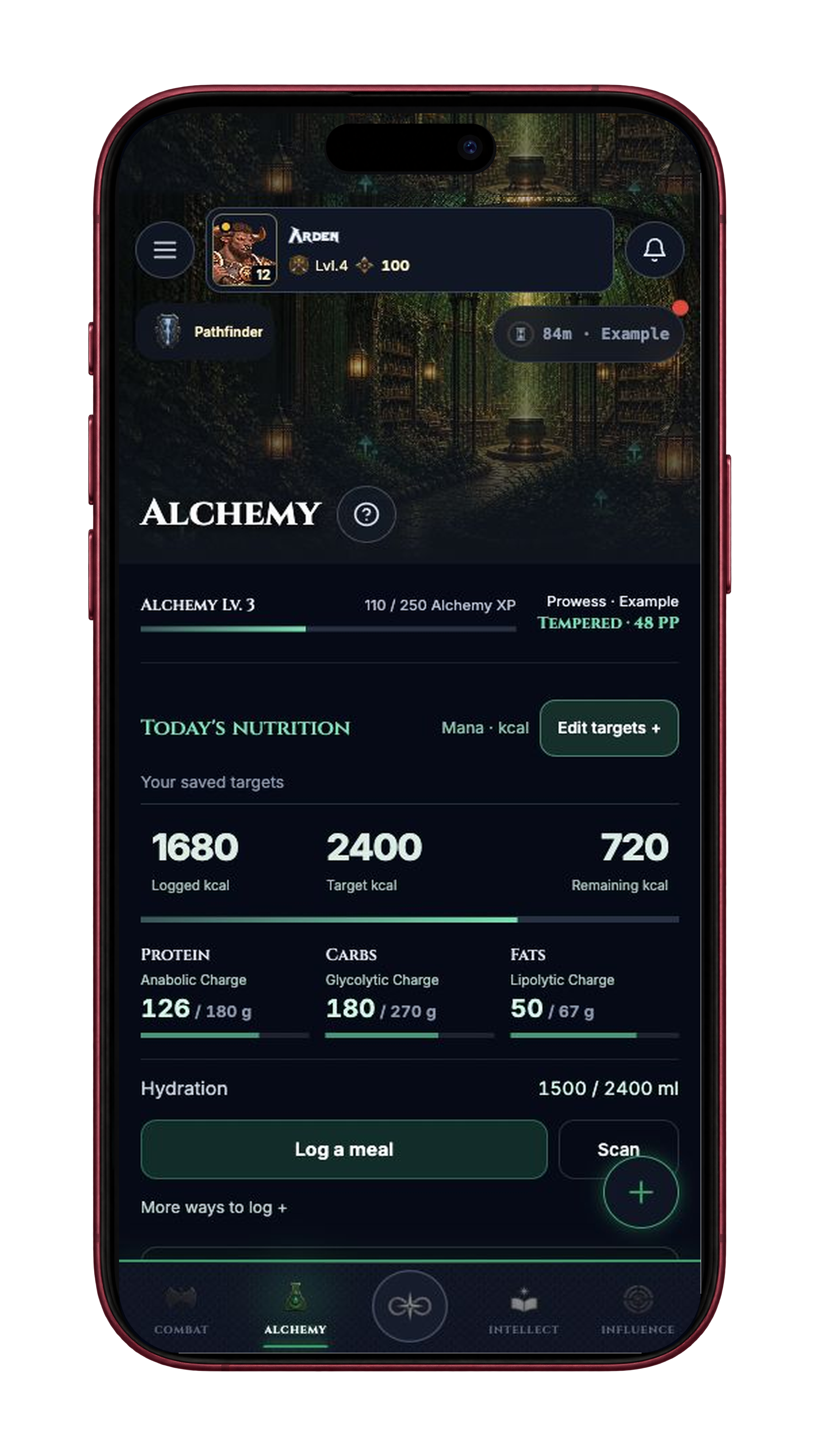
The Nexus, Combat, Alchemy, Intellect, and Influence hubs have all been redesigned. Each brings together its artwork, useful information, and entrances to the locations inside it, so you can see what matters and decide where to go next.
The Nexus puts your Avatar at the center, with artwork that reflects your race and clearer views of your specialization and active role progress. Missions, Oaths, Achievements, and Bounties stay within reach, while grouped controls make the rest of the hub easier to navigate.
Across the four disciplines, the dashboards help you get back to what you came to do:
Combat: return to your saved or active training and open the Training Grounds, with weekly context drawn from your recorded workouts.
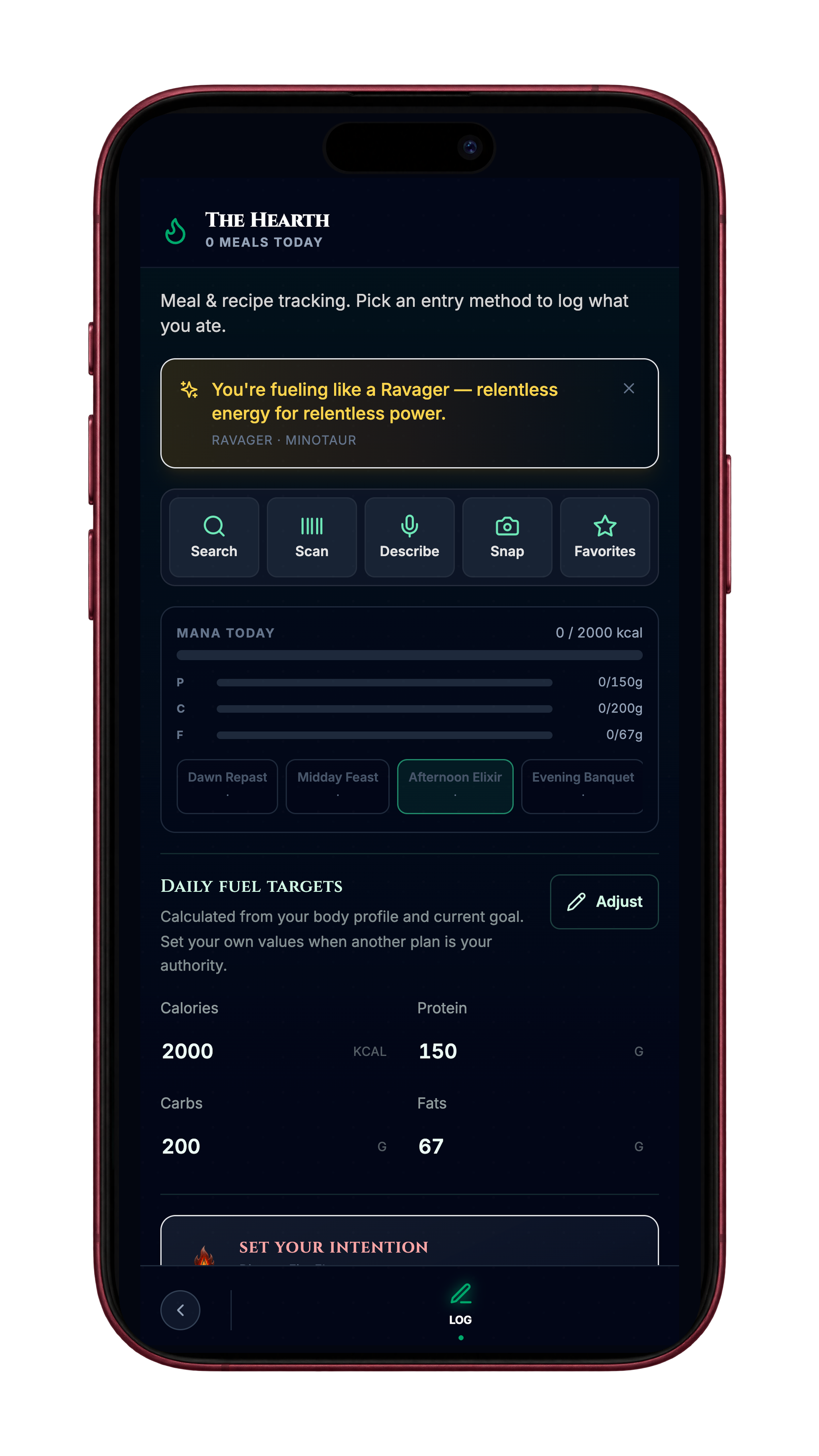
Alchemy: reach meal and water logging quickly, see your targets, and repeat a previously logged meal when one is available.
Intellect: check recorded Stamina and skill information, then open a breathing activity.
Influence: find online allies, requests, messages, and the community locations where you connect with other players.
Location emblems help distinguish the entrances. The introductions and spotlight tours have been updated to match the new layouts, including on smaller screens. Where information hasn't loaded or isn't available, the dashboards make that clear instead of showing an unexplained zero.
You can also open membership details from your tier seal to review your plan and explore what the eight Vanguard locations offer.
Move between hubs with fewer interruptions
Switching between Combat, Alchemy, Intellect, Influence, and the Nexus is more fluid.
Previously, moving to another hub could briefly replace the world with a loading screen. Now the current hub stays visible while the destination gets ready, and hubs you've already visited can remain ready for your return. Repeated trips between them no longer need to feel like starting over each time.
There are also fewer distracting transition notices, and routine background work has been moved away from the moment you're trying to navigate. The result is a cleaner path to the place you wanted to go.
Your device and connection still affect how quickly content becomes available. I won't call every transition instant. But reducing those interruptions makes a difference when you're moving between several parts of Infitnite in one visit.
Your workout becomes a two-way battle
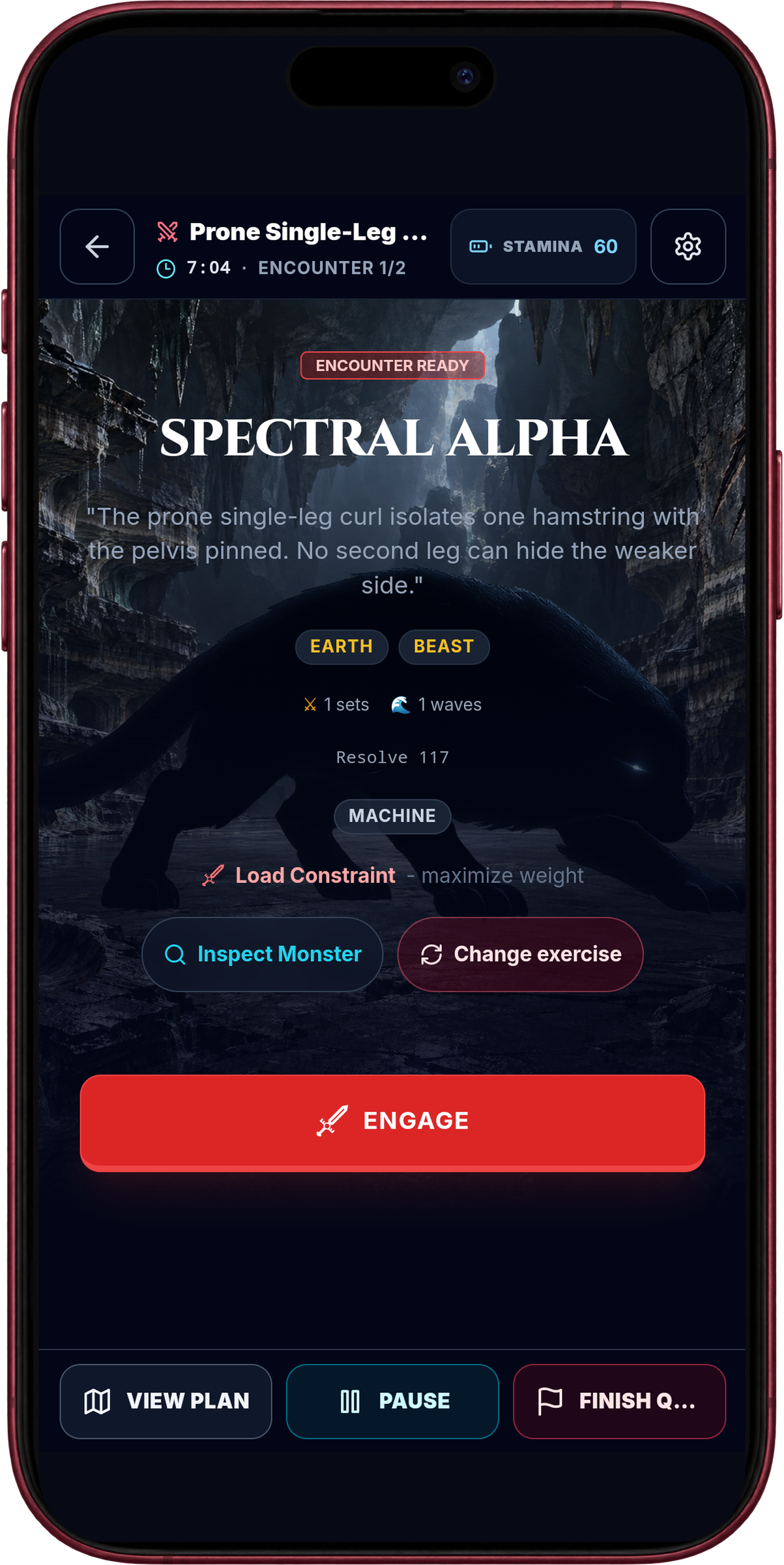
In Update 1, I previewed combat where monsters fight back. You can now play through that experience across the full workout flow.
A Combat Quest pairs your exercises with monster encounters. In the new combat experience, logging a set drives your turn, and the enemy response follows during recovery. Your real training remains the action at the center of the fight. You don't need to stop in the middle of a repetition to react to something on your phone.
Preparation, the active encounter, recovery, and results each have a clearer place. You can see the exercise you're performing, the work prescribed, and the battle you're progressing through without losing the thread of the session.
One practical addition is previous-set recall. When eligible history is available for an exercise, you can see the earlier performance and choose to use it in the current logger. That gives you a starting point when you return to a movement, instead of trying to remember the load or opening a separate history screen. Applying those values remains your choice.
Your logged work stays with the session when you adjust the plan, pause, or return later. You can open the plan and continue the workout without losing the work you've already recorded.
Cardio now gives you clearer feedback too. A time allowance and a monster's health aren't the same thing. A distance target you didn't reach also isn't the same as running out of time. The updated display and encounter outcome explain those differences so you can understand what happened in the activity you actually completed.
Monster artwork and the places you encounter it
Combat now gives its creatures more of a visual identity. New monster artwork appears alongside the encounters you're choosing and fighting, with environmental backgrounds that place the creature within the world. The setting and the monster belong together, giving you more to recognize than an encounter name alone.
This builds on the changes to combat's flow. You can see who you're facing and the place surrounding the fight while keeping the exercise and your logged work at the center of the experience.
Boss encounters with clearer instructions
Boss encounters deserve their own attention within that flow. When a challenge asks for a particular way of completing the exercise, you should be able to read that instruction where you're training.
The Boss Directive brings the encounter's written guidance into the battle screen. You can read the prescribed approach where you're training, instead of having to work it out from the encounter's name.
The instruction sits alongside the workout information. You can understand the challenge, do the work, and then see the result. The fantasy and the training connect through the exercise you actually perform.
Results you can follow from the workout into history
Players also reported combat grades that didn't seem to match the work they'd logged. Those reports helped shape the corrections to results and workout history.
The fixes since Update 1 address how completed work contributes to results and how the confirmed grade and rewards appear afterward. Your session result and saved history use the same confirmed outcome. A retry recovers the original result, and a workout still waiting to finish processing is shown as waiting.
Recovery now extends to more older-style and retrospectively entered workouts as well. If an accepted entry encounters a processing interruption, Infitnite can continue trying to finish it. The entry screen distinguishes a saved submission from a confirmed result, making it clearer when your workout is still being processed.
This doesn't mean every historical result has been recalculated. The changes protect the completion process and improve how its outcome is presented; any correction to an older workout still needs to follow what actually happened in that session.
A new beginning for your Warrior
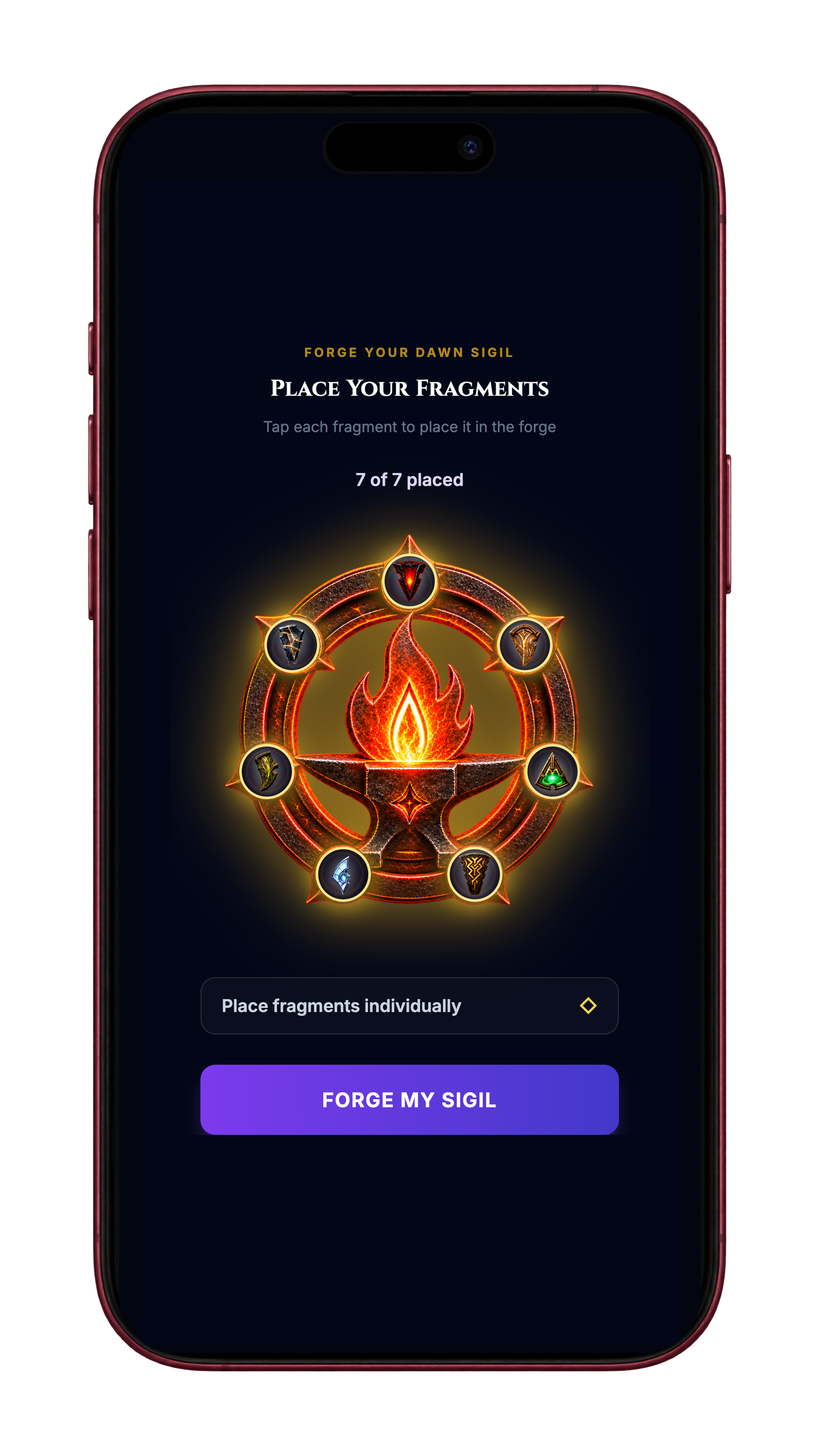
Creating your first Warrior now follows a more connected introduction: who you're becoming, how you want to train, and what you can actually do in Infitnite.
The new opening carries you from your identity and race into your lineage, build, and starting information. Your build brings together the choices that shape how your Warrior plays. You can review those choices before continuing, with opportunities to return to the relevant questions and make changes.
From there, First Sync introduces the four disciplines through real actions. Combat connects to training and physical effort. Alchemy covers nutrition and hydration. Intellect introduces focus and recovery. Influence is about support, privacy, and connection with other players.
You can choose a Quick or Full action, or skip a discipline. Skipping doesn't award progress. The point is to let you try the experience at a level that fits the moment, with a recap of what you completed before moving on.
Your answers also have context. Combat asks what motivates you and what tends to get in your way. Alchemy asks how you approach nutrition. Influence includes your preferences for privacy and support. Those questions belong beside the activities they help explain, so you can understand why you're answering them.
The opening culminates in your Dawn Sigil, the symbol formed from the identity and activity choices you've made, followed by your Warrior's arrival in the world. By then, you've already started building a relationship with your Avatar through the choices and actions that brought you there.
Returning after an interruption matters just as much as the first impression. The new flow keeps track of completed steps and confirmed actions so resuming doesn't depend on repeating everything you already did. You can return after an interrupted activity or a completed ceremony and continue from the progress already recorded.
Once you reach the Nexus, Infitnite's home base, shorter hub introductions explain where things are and how to use the quick-action menus. You can learn the purpose of a location before choosing to open it. That's useful whether you're arriving for the first time or returning after a break.
A clearer Constellarium and skill experience
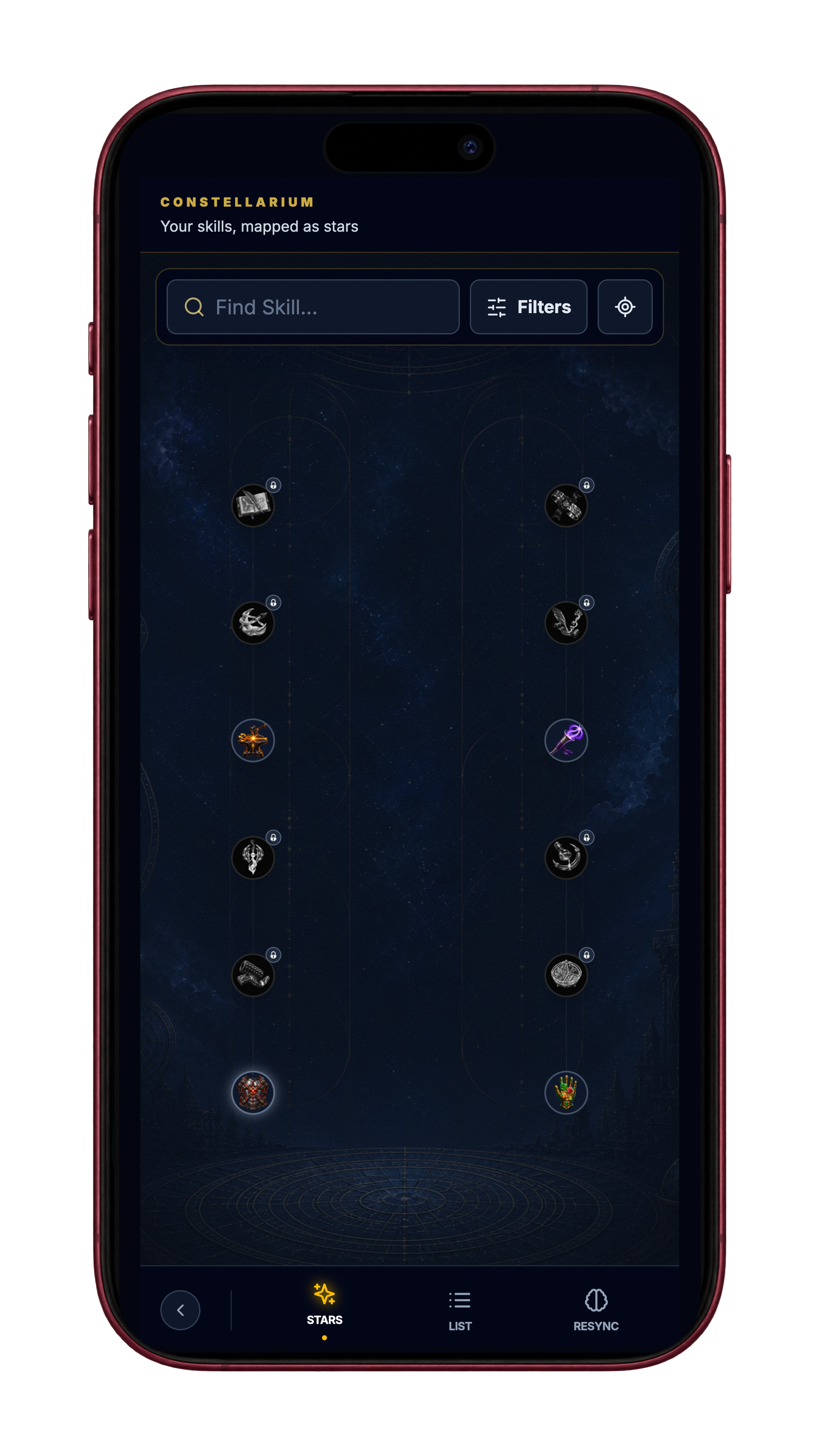
The Constellarium, the skill location in the Intellect hub, has received a substantial redesign. It gives you a clearer way to explore the skills connected to your Warrior and understand the path between them.
The constellation map is easier to move around, with more controlled dragging and zooming. Filters and the list view give you other ways to find a skill when you'd rather browse a list. Individual skills have clearer icons and detail panels, including their requirements and the controls for managing equipped abilities.
Those details matter. Seeing an interesting skill should lead to an understandable next step: inspect it, see what it requires, and work out how it fits into the abilities you're using.
You can also discover skills through relevant activities across the game. Discovery introduces a skill and gives you a reason to explore it; developing that skill follows its own requirements. Exploring the Constellarium and equipping an available ability remain separate from earning progress toward mastering it.
Equipped skills have a clearer place in your quest
An equipped skill can now show a ready cue when your logged activity meets its requirements. You can see when it's available and choose to activate it during the quest. Logging your training remains the action that moves the session forward.
Skill details also explain more of the benefits you've earned. Rarity and Transcendence, the milestones in a skill's development, can affect Skill Point gains and available charges. Eligible Ultimate skills receive their charge and cooldown benefits through the same progression system. The requirements shown for an ability matter, so discovering it doesn't mean every benefit is immediately unlocked.
Rifts are back
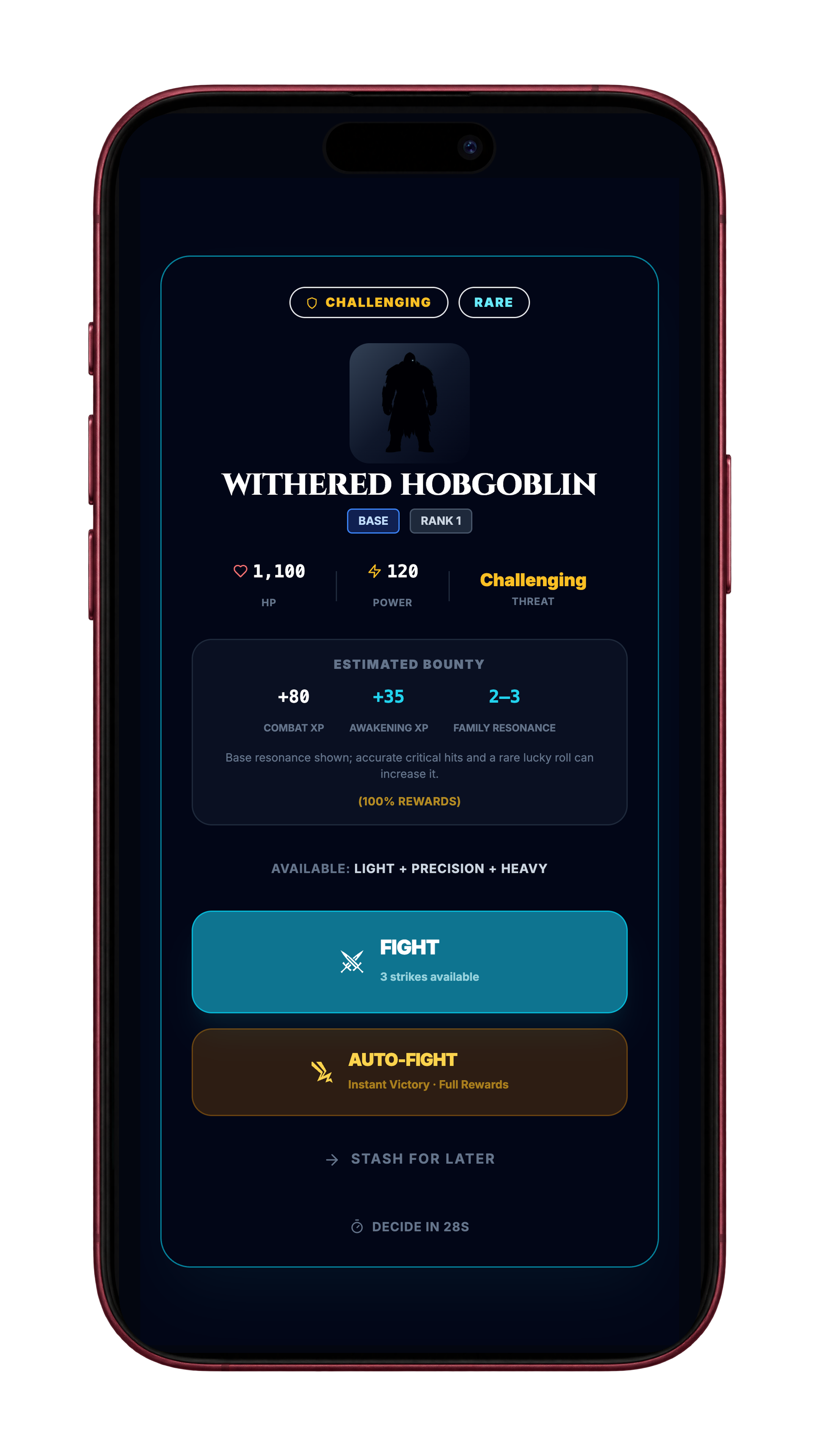
Rifts are encounters that can appear after an eligible completed workout. They give you another battle to take on beyond the session you've just finished.
You won't encounter one after every workout. There is a chance of an offer, with protection against repeated misses. Reopening the app isn't how you earn another chance; completing eligible training is what creates the opportunity.
The return experience has received attention too. If an offer arrives while you're somewhere it shouldn't interrupt, it can wait until you're back in a suitable part of the app. A waiting Rift can be recovered when you return, within its availability window.
The Rift Anchor, the control for your active and saved Rifts, helps you find what's waiting. Entering an encounter and returning after an interruption keeps you attached to the same fight, with its result recorded once.
Choose the conversations you want nearby
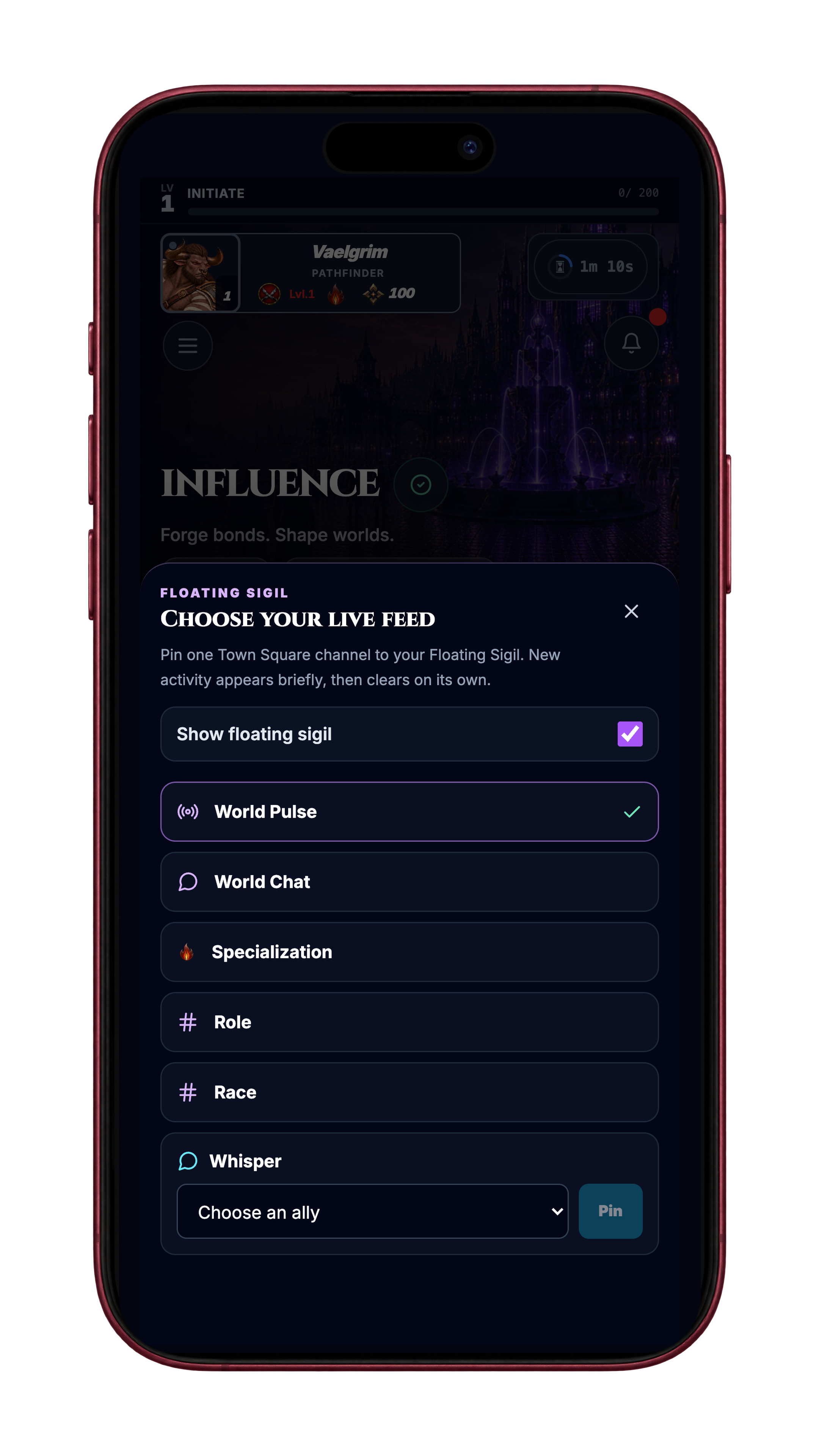
The Influence hub now has a configurable floating feed. You can choose the conversation source you want to follow, get a brief look at new activity, and open the conversation when you want to join in.
The selector includes public conversation sources and channels for your Warrior's race, specialization, and role. You can also choose an existing private conversation with an ally. Your selection is saved, and you can turn the floating feed off when you'd prefer a quieter hub.
Inside Town Square, the chat area, World is for public conversation, Pulse shows broadcasts, Whisper holds private ally conversations, and Channels groups the available shared conversations. The floating feed gives you a way to keep a chosen source close without staying inside the full chat screen.
A more useful Warrior's Circle
The forum has a clearer community structure, with places for discussions, achievements, training advice, nutrition, lore, and support. A bug report and a conversation about your latest workout don't need to compete for the same attention.
Support threads also have a more useful follow-through. When a fix is available, the person who reported the problem can confirm whether it worked for them. Official replies, confirmation prompts, and the way addressed reports are counted have received corrections so the thread gives a clearer account of where things stand.
Replies also give you more control over the conversations you see. You can block, mute, or report a reply from the thread, and saved posts and search are easier to use. I want the Circle to be a place where feedback is heard without asking you to stay in a conversation you don't want to see.
Across the September 5 audit and the late-September follow-up, I reviewed 65 distinct forum threads. The later batch received 14 follow-up replies after the relevant release. Those figures describe the feedback reviewed and answers delivered; a player confirming that a fix worked is a separate step.
That work includes reports from launch that I couldn't complete in Update 1, as well as the problems and ideas you shared afterward. Some led to targeted fixes. Others helped shape requested features and larger redesigns, including combat. The latest September 30 audit recorded 76 active forum threads; that is the size of the forum inventory at that point, rather than a count of resolved bugs.
That feedback led to practical fixes across the game. The rest time you choose during quest setup stays with the session. Previous weights and reps are easier to reuse. Photo attachments accept more iPhone formats, upload failures explain what happened, and progress-photo uploads can include several images. The Waystone, the path of objectives you work through, waits for a confirmed result before celebrating the reward.
Your feedback has been one of the most valuable parts of launch. Keeping those conversations usable helps me respond, and it helps other players find an answer that may already exist.
Improvements across all eight Vanguard locations
Vanguard's eight interior locations received a broad pass through the everyday actions inside them: reviewing recovery, tracking measurements, planning training, logging food, following guidance, and supporting allies. Saved information, interrupted actions, and the way each location explains its current state were a major part of that work.
Recovery and measurements in the Nexus
Shaman's Hollow, your sleep and recovery location, now handles bedtime consistency across midnight correctly. A late-night bedtime and an early-morning bedtime are compared as nearby times rather than opposite ends of a day.
Transmuter's Forge, your body-measurement location, displays metric and imperial units consistently across measurement cards, charts, and changes over time.
Training in Combat
Mage's Calculary, where you review strength, training volume, and readiness, more clearly distinguishes available records from missing information. Spellsword's Crucible, home to the Quest Library and Living Quests, received improvements to starting and recovering training sessions and reviewing their history. Together with the combat changes above, these fixes help keep your training journey connected when an action is interrupted.
Food and recipes in Alchemy
Alchemist's Lens, your meal-photo estimation tool, improves the handoff from a reviewed estimate to your meal log. You can review portions and corrections before logging, see when a save is pending or needs a retry, and recover without creating a duplicate meal. Deleted scans also stay deleted when an older save finishes later.
Witch's Cauldron, your recipe and meal-planning location, better preserves ingredients, recipe edits, and assigned meal slots after reloading. Pending changes can be retried after a connection interruption. Conflicting edits and unavailable recipes are shown clearly so you can resolve them, rather than having a different recipe silently take their place.
Guidance and support in Intellect and Influence
Enchanter's Compass provides personal guidance with objectives you can act on. Opening saved guidance doesn't use an Invocation, your allowance for Magical Intelligence requests. A new recalibration shows its cost before you confirm. Accepted objectives, completion, and history stay connected as you return to the location, with progress tied to the eligible actions you actually complete.
Sentinel's Watch, your ally-support location, more clearly handles missing ally information and Nudge requests. Requests respect relationship and privacy settings, blocks, cooldowns, and daily limits. A queued request is identified as queued, so it isn't mistaken for a delivered notification.
Across these locations, clearer loading, missing-information, and save-recovery messages help you understand what's happening and what you can do next.
An upgrade to Vanguard's Magical Intelligence

Magical Intelligence is the guidance available through Infitnite's in-game advisors. Vanguard members now receive an upgraded version, for the conversations and recommendations included in the subscription.
The work behind that upgrade included testing the requests used by our advisors and the Alchemist's Lens, the tool that estimates a meal from a photo. I also addressed responses that could fail to become a usable recommendation. Those responses now go through stronger checks and recovery before they're shown to you.
The Lens handles larger photos more efficiently, and I tested that change against weighed meals photographed from an angle. Its nutrition estimates still deserve your review, especially when portions or ingredients are hard to see. You can use the estimate as a starting point and correct the entry before saving it.
Meal logging that respects how you track food
Adding breakfast shouldn't wipe out lunch or dinner. Manual macro entry now gives you a clear choice between One meal and Whole-day import.
Choose One meal when you're entering the macros for an individual meal. Each entry saves separately and adds to the day's totals. Whole-day import is for copying a full day's numbers from another tracker; a new import replaces your earlier whole-day entry for that date. Using it on top of separately logged meals can count those numbers twice, so choose the mode that matches what you're recording.
Direct macro entries count toward your nutrition totals. Alchemy meal quests still use foods logged through the meal flow.
Food logging also received fixes around opening a quick entry, copying a saved full day, and reading barcode nutrition data. A barcode result with an unfamiliar nutrient field can still open, rather than stopping the whole scan. Your supplement loadout now saves the choices you make instead of losing them when you return.
Refreshed artwork across the world

The world has received new artwork beyond your Warrior and the creatures in combat. Updated hub and location images give the places you visit more visual detail, from the main hubs to the locations within them.
Those changes carry the visual refresh into the parts of Infitnite you return to throughout the day. Your Warrior, the entrance to the world, and the places where you train, log meals, explore skills, and meet other players now share more of that attention to presentation.
A title screen with depth and movement
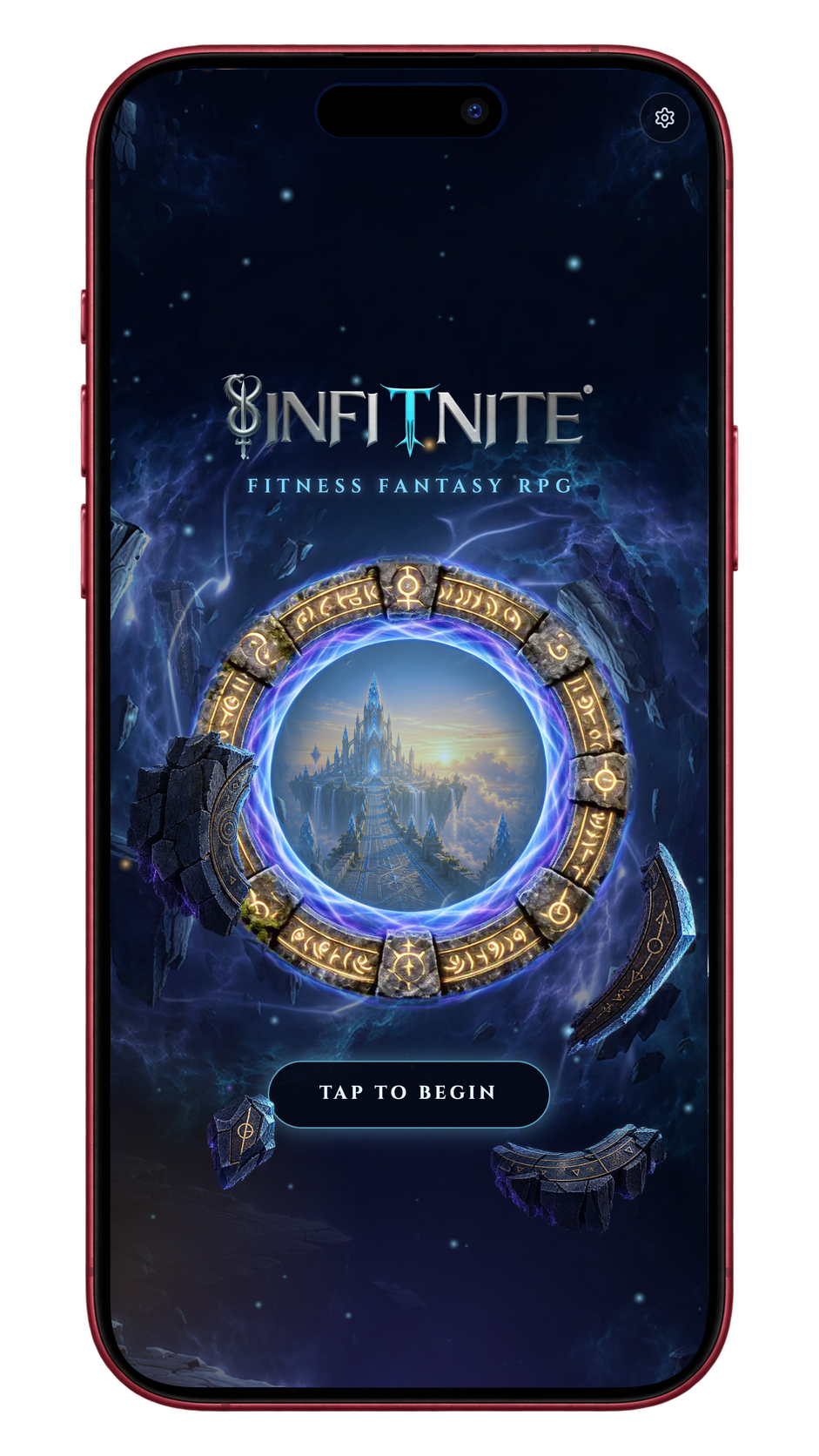
The upgraded title screen deserves a moment before you begin. Floating fragments move at different depths around the portal, while the background and the portal itself have their own movement. Together, those layers give the scene a 2.5D sense of depth: the artwork feels dimensional without turning the entrance into a fully 3D world.
Beginning your journey carries you toward and through the portal, connecting that first view of the world to the transition into it. The fragments, atmosphere, and movement all contribute to the entrance, rather than leaving you with a still image while you wait to play.
I've shared the inspiration behind Infitnite's original title screen before. This is a new version of that entrance, with more attention to how it moves and how it feels to return. I wanted it to be something you enjoy seeing again. A reduced-motion option keeps the same visual identity with less movement.
Workouts that can recover when your connection drops
When a connection breaks during an eligible workout, the work you've recorded can stay saved on your device so you can continue the session and return to it. The saved workout can upload when you're connected again, and its result appears in history without asking you to start over.
Rewards for an offline workout are decided when the server receives and checks it. The app distinguishes work saved on your device from a result and rewards the server has confirmed, so you can tell which step is complete. A retry won't turn the same workout into a second reward.
This depends on the app and workout content already being available on your device before the connection drops. Clearing app data can remove a workout that has not uploaded yet.
Apple Health can sync automatically
Update 1 kept Apple Health connection and sync manual while I checked the automatic experience. That has moved forward.
On supported iPhones, you can enable automatic Apple Health sync after connecting and granting the relevant permissions. New supported activity can reach Infitnite without you having to press Sync for each update. Manual controls remain available.
Returning to the app and signing in after a health connection have received attention too. The improvement is specific to Apple Health on iPhone; it isn't an announcement of a new Android health connection.
Waystone progress follows the work you've done
The Waystone now follows more of the activities that count toward its objectives, including eligible cardio and interval training, preparation sessions, boss encounters, and meals logged on distinct days. If your progress takes time to appear, returning to the Waystone can reconcile it from recorded activity without requiring you to repeat the action.
Claims check the activity behind an objective before awarding it. Meal logging also feeds the connected daily missions and other eligible goals again, so one confirmed entry can advance the places where it belongs without counting as several meals.
Smaller fixes that matter when you come back tomorrow
Daily rewards, quick logs, and your inbox have received attention alongside the larger features.
Login rewards: corrections to calendar rollover and reward claims help the displayed day and available reward stay aligned when a new day begins.
Reward celebrations: the confirmation you see is more closely tied to the reward that was actually recorded, with recovery for interrupted delivery.
Meal and sleep logging: fixes help meal progress update after logging and return you to the right input when using a quick log.
In-game mail: messages stay in the expected order, with corrections to unread status and links that take you to the relevant destination.
Workout lists: encounter-selection scrolling and card details received fixes, reducing jumping and missing information while building a session.
Living Quests: the workout mode that builds a run one encounter at a time can recover an active run, rather than leaving you at a dead end after an interruption.
Combat history and achievements: fixes restore history that could appear empty and allow eligible achievement claims and cardio records to complete correctly.
Quick cardio: Log a Walk starts a short walk quest from a quick action, with a manual entry option and a way to use available health data.
What your feedback made possible
Update 2 grew because I was responding to the launch experience while also bringing parts of the post-launch roadmap forward. Working on fixes alongside major changes, especially combat, was challenging. It helped me understand my limits as a solo developer and how to deliver improvements more efficiently.
With Update 2 released, I'm excited to move further into that roadmap. I plan to follow this update with smaller, more frequent releases, rather than letting another large collection of changes build up over such a long gap. The reliability and consistency you've asked for are the foundation that future content needs.
Thank you for your patience, passion, and persistence. After you've spent time with Update 2, tell me in the Warrior's Circle which part feels better and where you're still getting stuck. Those details help shape what I work on next.


Recent Developer Updates


New Avatars, two-way workout combat, a new beginning, expanded skills, and a refreshed world. Explore the changes and player-requested fixes in Update 2.